Page 1 of 1
windows v1.6.4 with problem
Posted: Tue Oct 24, 2023 6:24 pm
by hpsxrb
Hello everyone and especially those who developed the excellent Money Manager EX!
In money manager ex v1.6.4 (windows version) despite having the date as dd/mm/year in new transactions it appears as mm/dd/year
ps- this happens in both English and Portuguese.
Thank you.
Hugo
Re: windows v1.6.4 with problem
Posted: Tue Oct 24, 2023 6:40 pm
by Renato
Hello Hugo
Here you can format the date:
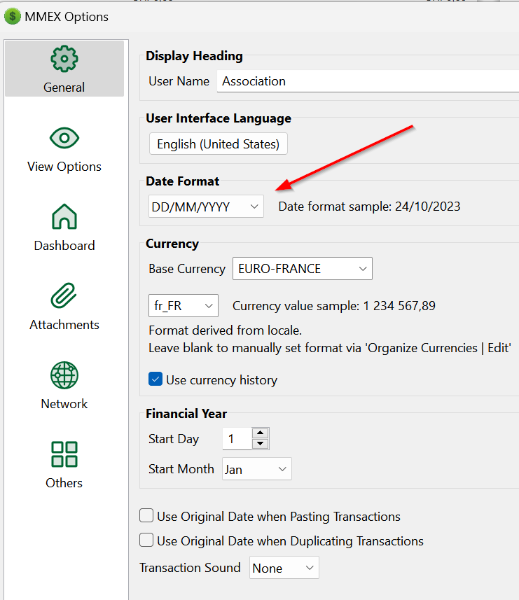
- mmex01.png (91.23 KiB) Viewed 30719 times
Re: windows v1.6.4 with problem
Posted: Tue Oct 24, 2023 6:51 pm
by hpsxrb
Thank you very much Renato for your help but I already have the date formatted correctly (as in your example).
Whenever I change the date formatting, the change is respected in the list of transactions but is never respected when inserting a new transaction.
Maybe it has to do with the recently installed Windows 11, but on this one I already have the date formatted properly.
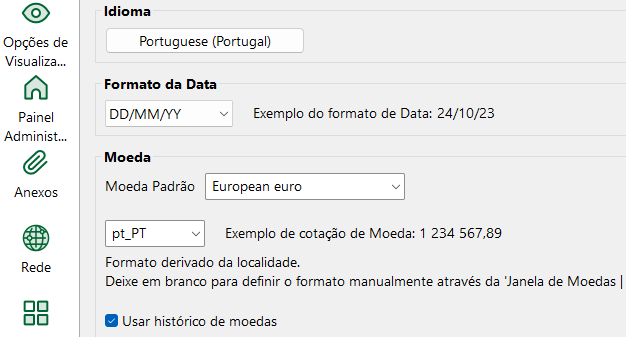
- My selected options
- Screenshot 2023-10-24 201827.png (27.07 KiB) Viewed 30715 times
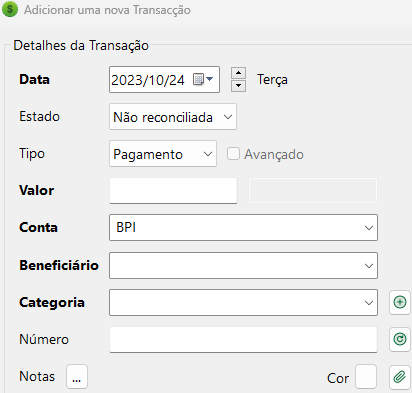
- and the date format for a new transaction
- Screenshot 2023-10-24 201901.png (19.29 KiB) Viewed 30715 times
Re: windows v1.6.4 with problem
Posted: Tue Oct 24, 2023 9:04 pm
by Renato
Re: windows v1.6.4 with problem
Posted: Wed Oct 25, 2023 10:34 am
by hpsxrb
Problem solved, there is no doubt that it was the settings in Windows 11. Thank you very much for your help.