Page 1 of 2
Problem with the desktop display
Posted: Fri Dec 29, 2023 11:31 am
by Meikelbln
I have been having problems with the display of my start screen for some time. The desktop is displayed incorrectly. Scroll bars are displayed and no windows. It concerns a computer with Windows 10 (version 22H2). There are no problems on another computer with Windows 10 and a computer with Windows 11. The database is on a box drive. It is a test database for the screenshot. However, I suspect the problem is not with MMEx but with Windows. But maybe someone has an idea. It was at version 1.6.4 and is still at version 1.7)

- SC MMEX.jpg (10.75 KiB) Viewed 69149 times
Re: Problem with the desktop display
Posted: Fri Dec 29, 2023 12:21 pm
by luisdev
I'm confused. What do you mean by "desktop is displayed incorrectly"?
What is wrong with your display?
Re: Problem with the desktop display
Posted: Tue Jan 02, 2024 12:47 pm
by Meikelbln
Well, I'll try to explain it better:
Here I show a correctly displayed desktop
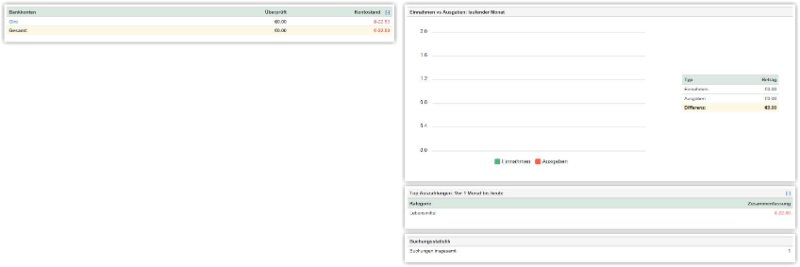
- Clipboard01.jpg (13.16 KiB) Viewed 69077 times
This is the incorrectly displayed desktop on the problem computer. I hope you can recognise the difference.

- Zwischenablage01.jpg (10.12 KiB) Viewed 69077 times
Re: Problem with the desktop display
Posted: Tue Jan 02, 2024 1:22 pm
by Renato
I would suggest deleting the file mmexini.db3
Re: Problem with the desktop display
Posted: Tue Jan 02, 2024 1:33 pm
by luisdev
Renato wrote: Tue Jan 02, 2024 1:22 pm
I would suggest deleting the file
mmexini.db3
Thanks Renato.
What is that mmexini.db3 file?
Re: Problem with the desktop display
Posted: Tue Jan 02, 2024 1:48 pm
by Renato
The mmexini.db3 file stores only language settings, screen size, last opend DB files etc.
All financial sensitive settings will be safe and is stored in the .mmb Files.
XXXX is the Username from Windows
C:\Users\XXXX\AppData\Roaming\MoneyManagerEx\mmexini.db3
for more information you can search here:
search.php?keywords=mmexini
Re: Problem with the desktop display
Posted: Tue Jan 02, 2024 1:51 pm
by Meikelbln
Renato wrote: Tue Jan 02, 2024 1:22 pm
I would suggest deleting the file
mmexini.db3
Thank you Renato. I have deleted the file. But it was not successful. The display has not changed.
Re: Problem with the desktop display
Posted: Tue Jan 02, 2024 2:07 pm
by Renato
This is probably due to the settings in Windows.
Are you using the custom scaling of the screen, if so how much %?
Can you take a screenshot of the whole screen with MMEX / about open?
Re: Problem with the desktop display
Posted: Tue Jan 02, 2024 2:33 pm
by Meikelbln
Yes, I'm also afraid that it's some kind of Windows problem. I don't use the custom scaling. Everything is set to default values.
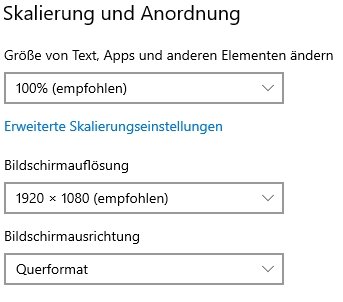
- Skal01.jpg (18.71 KiB) Viewed 69042 times
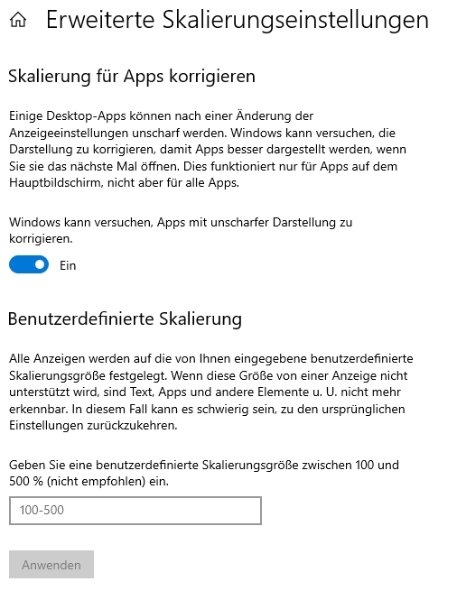
- Skal2.jpg (52.91 KiB) Viewed 69042 times
and here is the whole screen
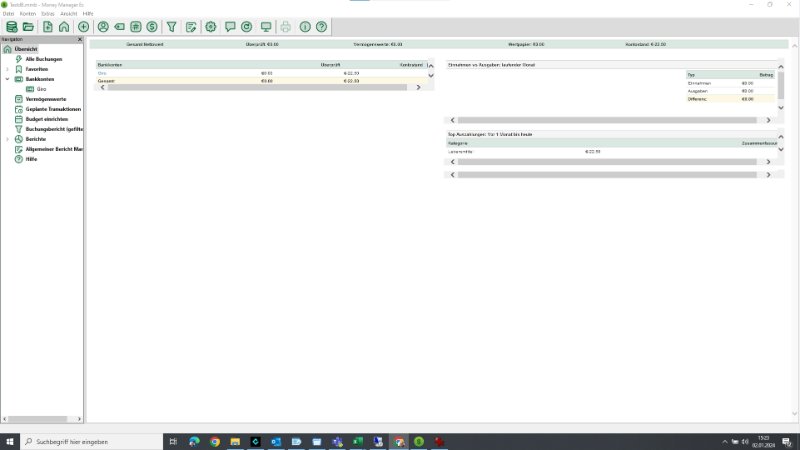
- Screen.jpg (27.58 KiB) Viewed 69042 times
Re: Problem with the desktop display
Posted: Tue Jan 02, 2024 3:26 pm
by Renato
Thank you very much for the information, that's a tricky one.
If you are using the portable MMEX version ??, then the mmexini.db3 to be deleted would be in the extracted directory.
by the way: with
Everything https://www.voidtools.com/ you can check if there are other mmexini.db3.