Page 1 of 1
Power BI on MMEX with SUID
Posted: Sun Apr 06, 2025 1:54 pm
by oogyboogydad
This functionality has stopped my ability to use Power BI to build a dashboard, as the 16 digit length of the IDs is too long for Power BI to import. I only ever see the first 10 digits of any of the new IDs, and even transforming them to text does not bring in the entire ID.
Would it be possible to run an integer-based ID in tandem with the new SUID system in each of the tables?
Re: [SOLVED] Transaction number
Posted: Sun Apr 06, 2025 2:57 pm
by MlinMMEX
<< to use Power BI to build a dashboard>> So you manage transactions in MMEX and then export to PowerBI for your real reporting needs?
Yeah... it is clear that MMEX's "Achilles heel" is reporting.
Re: [SOLVED] Transaction number
Posted: Sun Apr 06, 2025 3:24 pm
by oogyboogydad
@MlinMMEX Yes, exactly right. I do find MMEX difficult to get reporting working.
Although the real reason for trying to build the PowerBI dashboard to is to upskill myself to try to keep up with the younglings at work!
Re: Power BI on MMEX with SUID
Posted: Sun Apr 06, 2025 11:11 pm
by guangong
Wow, can you try out Power BI's
Whole Number
Whole number has no digits to the right of the decimal place. This type allows for 19 digits of positive or negative whole numbers between -9,223,372,036,854,775,807 (-2^63+1) and 9,223,372,036,854,775,806 (2^63-2), so can represent the largest possible numbers of the numeric data types.
Re: Power BI on MMEX with SUID
Posted: Mon Apr 07, 2025 6:02 am
by oogyboogydad
@guangong Thank you for the tip! Although after some more testing I'm not sure it's Power BI that's doing the truncation to 10 characters, it may be the ODBC driver. The field doesn't refresh the full string even when converting to Text, still only the leftmost 10 digits are imported, so the truncation seems to be occurring before Power BI is involved.
If anyone has any suggestions for importing this field, I'm all ears!
Thanks
Nick
Re: Power BI on MMEX with SUID
Posted: Mon Apr 07, 2025 11:06 am
by guangong
It's an integer field.
Would you share some screenshots to illustrate your settings?
Re: Power BI on MMEX with SUID
Posted: Mon Apr 07, 2025 4:52 pm
by oogyboogydad
Thank you
@guangong
Here are two screenshots:
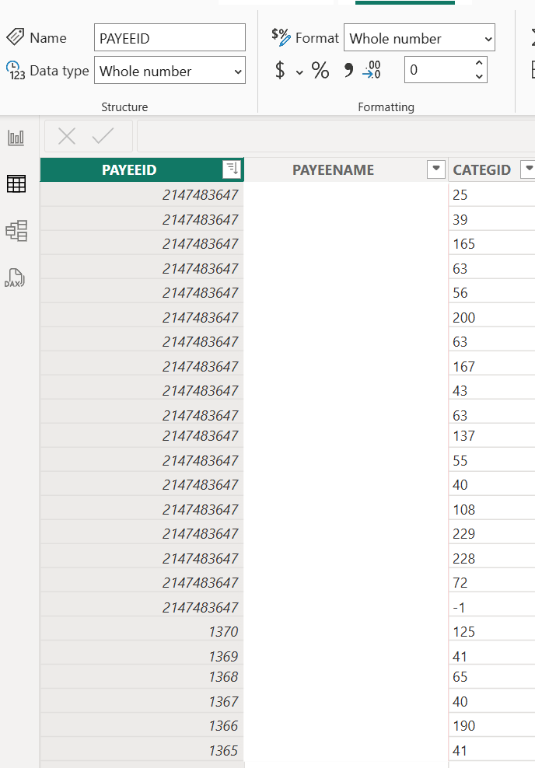
- Payee IDs, althouh of the "Whole Number" type, only showing the left-hand most 10 digits
- Screenshot 2025-04-07 185008.png (100.16 KiB) Viewed 75023 times
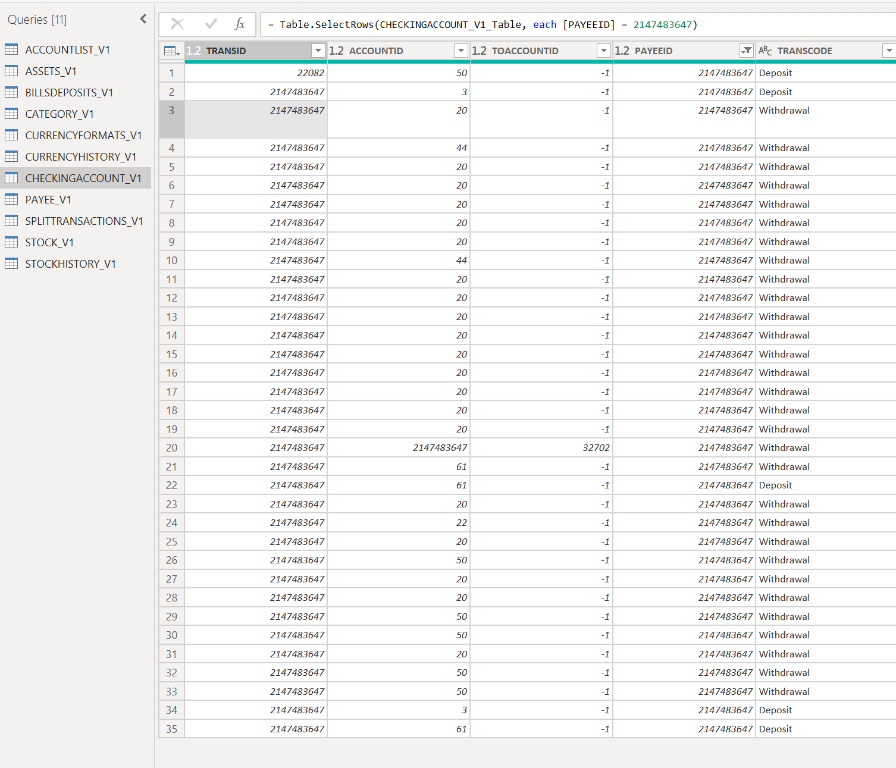
- Most recent transactions, showing all SUIDs truncated to 10 characters
- Screenshot 2025-04-06 152718.png (203.65 KiB) Viewed 75023 times
You can see that every instance of the SUID is truncated to the left-handmost 10 characters.
I have checked the type of all these fields, and all of them are "Whole Number". The situation does not change when I change the type to "Text".
You can also see that the data in the PayeeID field is actually "2147483647" because I was able to filter on that specific value in my SelectRows statement.
Any suggestions gratefully received.
Kind regards
Nick
Re: Power BI on MMEX with SUID
Posted: Thu Apr 10, 2025 1:12 am
by guangong
Would you set up Power BI from scratch with a new database copy? I suspect it was due to some previous settings
Re: Power BI on MMEX with SUID
Posted: Fri Apr 11, 2025 7:13 am
by guangong
Re: Power BI on MMEX with SUID
Posted: Mon Jun 02, 2025 9:30 am
by lucasbank
Yes, it is possible to run an integer-based ID alongside the SUID system in each table. This approach would maintain compatibility with tools like Power BI by providing a simpler numeric identifier, while still using SUIDs internally for uniqueness and consistency.