Page 1 of 2
Cannot open database
Posted: Sun Apr 26, 2020 8:03 am
by hugo
I installed the 1.3.4 64bit version on my windows 10 pc (Updates up to date). When the program starts it shows an error screen saying that it can't open the database. When I click OK all the data is there. However, when I want to add, delet or change a record, it can't save it, again giving a different database error. (See attachments)
Lately I had similar problems with 1.3.3 but by renaming the database files in explorer the engine worked. I had to rename each time windows was restarted.
So I reverted back to 1.3.3, at least that version keeps working despite the hassle of renaming the database each time.
Re: Cannot open database
Posted: Sun Apr 26, 2020 9:17 am
by Nikolay
Seems something is wrong with DB stored info.
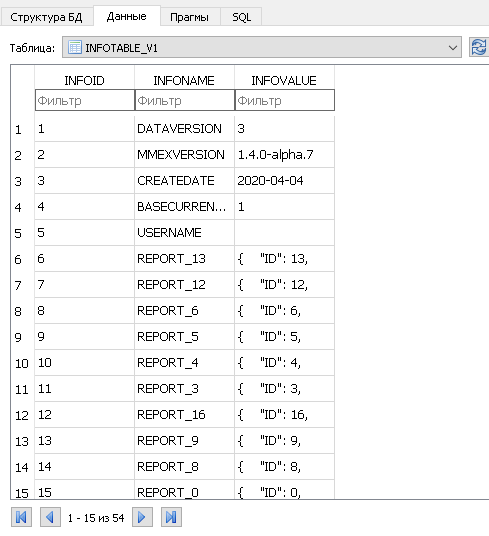
In the example below every INFOID field has unique index (1, 2, 3 etc)
In your examples INFOID has invalid value = -1;
- Capture.PNG (13.96 KiB) Viewed 17400 times
Possible solution:
1. Install
https://sqlitebrowser.org/
2. Copy your DB (.mmb file) to some folder.
3. Download
https://sourceforge.net/projects/moneym ... p/download and extract to the same folder.
4. Run sqlitebrowser and open copy of your DB (.mmb file)
5. Delete INFOTABLE_V1 and close sqlitebrowser
6. Run mmex portable edition and open copy of your DB (.mmb file)
7. Select Base currency at startup and Voi la
But there may be a more complicated case.
Re: Cannot open database
Posted: Sun Apr 26, 2020 2:08 pm
by hugo
Thanks for the quick answer. I got as far as what you see in the attachment..
Re: Cannot open database
Posted: Sun Apr 26, 2020 3:15 pm
by Nikolay
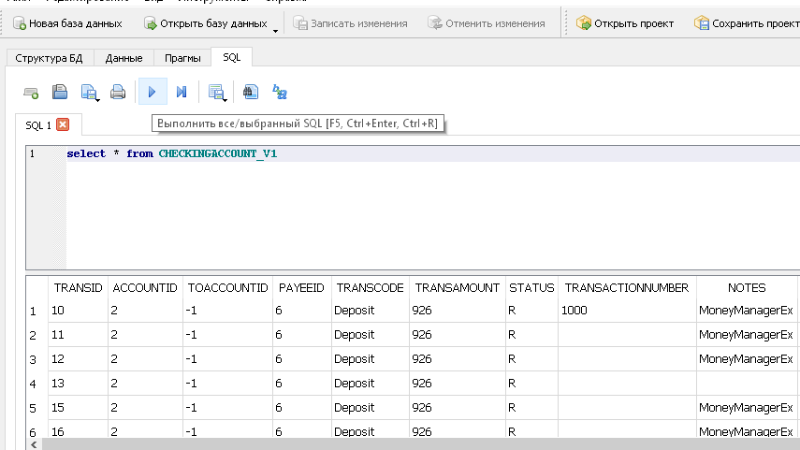
It looks as if the database contains data, but does not control it. Perhaps this data cannot be recovered.
The only hope is to find a backup of the database at the time when it was working.
To verify the data, you can make a request in this developer. In case if some line sappers... You can save this data with not simple manipulations.
- checking.PNG (56.47 KiB) Viewed 17393 times
Re: Cannot open database
Posted: Sun Apr 26, 2020 3:59 pm
by Renato
Re: Cannot open database
Posted: Sun Apr 26, 2020 4:14 pm
by hugo
Oh but the database is working fine if I rename it first in explorer and I use 1.3.3
All the entries are there and I can add records and modify them.
There might be something wrong with permissions although all files and folders have admin privileges and I run MMEX as admin.
I ran sfc /scannow and there were some errors in the system files but fixing them didn't help MMEX problems.
I ran chkdsk and the disk is fine.
Will try to get further into this as I like the updated features in 1.3.4
Thanks a lot so far.
Re: Cannot open database
Posted: Sun Apr 26, 2020 4:18 pm
by hugo
Oh but the database is working fine if I rename it first in explorer and I use 1.3.3
All the entries are there and I can add records and modify them.
There might be something wrong with permissions although all files and folders have admin privileges and I run MMEX as admin.
I ran sfc /scannow and there were some errors in the system files but fixing them didn't help MMEX problems.
I ran chkdsk and the disk is fine.
Will try to get further into this as I like the updated features in 1.3.4
Thanks a lot so far.
Re: Cannot open database
Posted: Sun Apr 26, 2020 4:19 pm
by hugo
Thanks Renato, I'll have a look into that.

Re: Cannot open database
Posted: Sun Apr 26, 2020 4:43 pm
by hugo
I ran the PRAGMA integrity_check and the program returns "Integrity check: OK"
Re: Cannot open database
Posted: Sun Apr 26, 2020 6:24 pm
by hugo
Upon installing the new 1.3.4 I got a Microsoft windows popup telling me the program was not safe to install.
Of course I ignored that and clicked 'Install anyway'
But in the deep catacombes of Windows Defender a setting was changed for the MMEX database files, blokking them for read and write.
Well sort off, because within MMEX I could still see all the data.
So I switched off 'Controlled folder access' in the virus settings of Windows Defender and now MMEX works like a charm.
Indeed, there were countless entries in the log file, all pointing to the location of my database files.
Thanks for all the support.