Page 1 of 1
Can't move a column
Posted: Tue Apr 15, 2025 11:47 am
by chrishn462
Hi
Not sure if it is bug. I have a credit card account that has customised columns but I wanted to move "credit" column from the end to somewhere in the middle of my choice but when I switched to any of my accounts. It moved back to the end. :/
My other 2 credit card account does not have the "credit" column in the "hide/show columns" list - that is ok - no problem because it is how I set those credit card accounts up. The one I was trying to move "credit" column to the left, is actual credit card account (that has credit limit set in the "edit account" box)
MTIA
@chris_aerospace
Re: Can't move a column
Posted: Tue Apr 15, 2025 1:15 pm
by Renato
If you tell us which operating system and which MMEX version the problem occurs with, we might be able to help you.
Re: Can't move a column
Posted: Tue Apr 15, 2025 2:24 pm
by MlinMMEX
I also checked in v1.9.1 beta that is also fine and ok on maintaining the layout on the account window...
BTW, I posted a similar issue on the Payee Manager in the forum days ago.
viewtopic.php?t=11395
Re: Can't move a column
Posted: Tue Apr 15, 2025 4:10 pm
by chrishn462
Hi Renato
Windows 10 64-bit;
MMEX Version: 1.9.0 64-bit;
HTH

Hi MlinMMEX - thanks for insight of a newer version even though it is in beta stage
Thanks
@chris_aerospace
Re: Can't move a column
Posted: Mon Aug 10, 2026 11:42 am
by chrishn462
Hi
A sort of re-post - Sorry but in the new version 1.9.3, in one of my credit card accounts, I now can't move the "credit" column from the right end (of all columns) to where I want it to be.
Once I had moved the "credit" column, and then I went to my other accounts to work on and when I go back to that "credit card" account - the "credit" column returns as the last column at the right end again.

There must be a setting to force and save the layout of columns?
Thanks
@chris_aerospace
Re: Can't move a column
Posted: Mon Aug 10, 2026 5:58 pm
by Renato
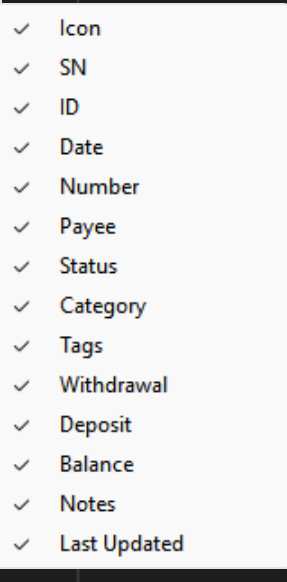
I have the following columns:
- MMEx21.png (49.4 KiB) Viewed 22805 times
.
I can't find one labeled “Credit”
Re: Can't move a column
Posted: Tue Aug 11, 2026 2:24 am
by GroenieDieDraak
The Credit column is at the right most position (horizontal scroll to see it). I moved it left before the Notes column so I can see it without scrolling.
After clicking on another account and coming back to Credit Card, it moved to the far right again as per chrishn462.
Left picture after I moved it. Right picture after coming back to the credit card.
Re: Can't move a column
Posted: Tue Aug 11, 2026 7:01 am
by Renato
Re: Can't move a column
Posted: Tue Aug 11, 2026 9:21 am
by chrishn462
Hi Renato
Done. (Can't move a column, #8467)
@chris_aerospace